
What Exactly Is the Difference Between CPU, GPU and NPU? A Complete Guide to Embedded, Industrial Control and Selection
Anyone doing embedded development, tinkering with industrial control boards or debugging on-device AI has almost certainly wrestled with the same question:
All are chips, so why do some boards win on CPU stability, others on GPU display, and others on NPU AI computing power?
How exactly do the three divide the work?
How should different projects choose a chip, and how do you avoid the pitfalls?
This article skips the jargon. Using plain language and real measured cases from industrial control boards, together with the full Rockchip platform range, it walks you through the essential differences between CPU, GPU and NPU — so you can choose confidently, avoid pitfalls and not waste budget.
1. A plain breakdown: the core division of labour between CPU / GPU / NPU
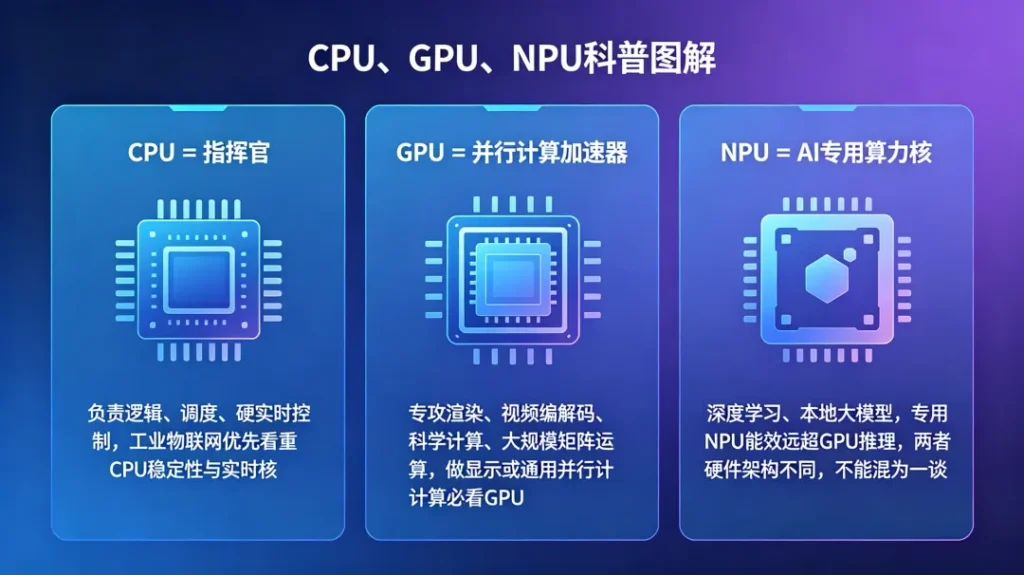
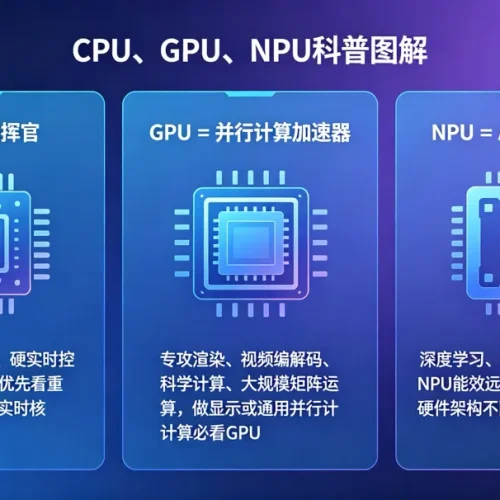
1. CPU: the device’s “master brain and supreme commander”
The CPU’s strength is not raw speed, but flexibility, judgement and stable scheduling.
It consists of a small number of high-performance large cores and focuses on serial logic operations, complex decisions and real-time task scheduling.
Its main responsibilities:
• System operation and process management
• Peripheral control, serial/network/IO scheduling
• Protocol parsing, data exchange, human-machine interaction
• Industrial real-time control, device status management
Weakness: it is not suited to large batches of simple, repetitive parallel operations, nor to pure AI inference and large-scale image rendering.
2. GPU: a large-scale parallel “graphics and computing accelerator”
The GPU is the opposite of the CPU: it has a huge number of simple cores, well suited to doing thousands of repetitive tasks at once.
Originally built for image rendering alone, it is now a general-purpose parallel computing unit supporting video codecs, matrix operations and parallel vision processing.
Its main responsibilities:
• Screen rendering, independent multi-screen output, UI drawing
• 4K/8K hardware video encoding and decoding
• Image preprocessing, scaling and stitching
• General-purpose parallel matrix computation
Misconception corrected: a GPU can run AI, but it is not architected for AI and is far less efficient than a dedicated NPU.
3. NPU: a dedicated “neural network computing core” built for AI
Many people assume the NPU is simply “a stronger GPU” — this is the biggest selection mistake of all.
The GPU is a general-purpose parallel unit; the NPU is a hard-wired neural network architecture optimised specifically for convolution, pooling, activation functions and matrix inference.
Core NPU advantages:
• Extremely high AI inference energy efficiency and lower power consumption
• High compute density: models run faster and generate less heat
• Supports quantised inference and concurrent multi-channel video AI
In short: rendering relies on the GPU, AI relies on the NPU.
4. Today’s mainstream embedded architecture: heterogeneous collaboration
Today’s mainstream Rockchip industrial SoCs all use a CPU + GPU + NPU heterogeneous computing architecture:
✅ CPU coordinates scheduling and keeps the device stable
2. Hardware cases: understanding the real differences between chips
1. CPU-focused stability: the first choice for industrial control and IoT (RK3568)
Corresponding hardware: Rocktech MTB-720B motherboard
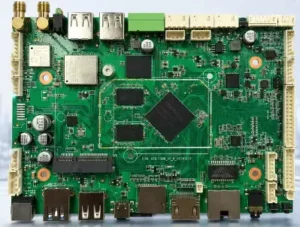
Configuration: quad-core A55 at 2.0 GHz, NPU 1 TOPS (lightweight AI only)
This board has no exaggerated high-compute spec sheet, but its industrial stability is outstanding. With multiple serial ports, network ports and IOs hosting devices at the same time, protocol forwarding stays stable — no stuttering, no data loss. The GPU only covers basic display; everything gives way to “industrial stability”.
Best-suited scenarios:
• Industrial data acquisition terminals
• Energy storage gateways, IoT gateways
• Vending machines, EV charging terminals
• Conventional industrial HMI
• Medical testing
• Transportation, security and power industries
2. The balanced all-rounder:Strong GPU and the best value (RK3576)
Corresponding hardware: MTB-760/761 motherboards
Configuration: octa-core architecture, Mali-G52 GPU, 6 TOPS NPU, AnTuTu score 400,000+
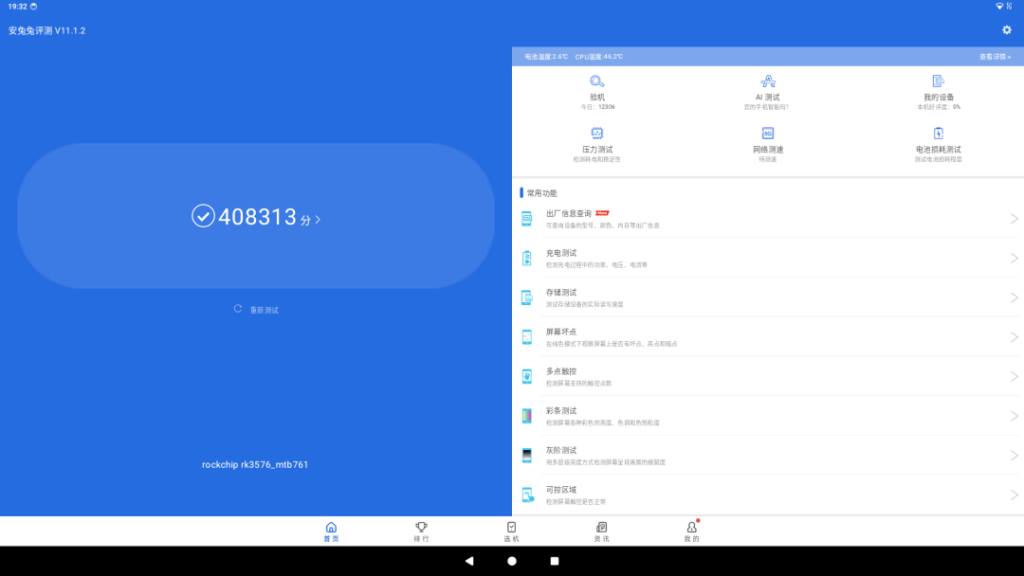
The CPU is entirely sufficient for everyday scheduling, while the GPU is deeply optimised for video processing and rendering, supporting smooth 4K output. Small robots and lightweight vision projects get low latency with no ghosting.
Suited to:
• Hotel service robots, cleaning robots
• Access control gates, facial recognition terminals
• Smart lockers, self-service equipment, small and medium commercial displays
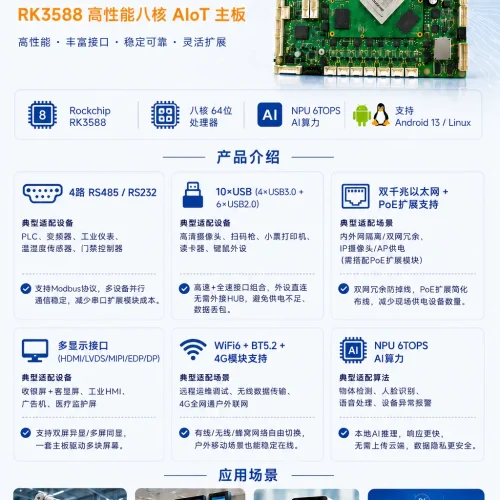
3. Flagship high performance: strong GPU + strong NPU, the fully loaded option (RK3588)
Corresponding hardware: Rocktech RCB-8800 core board + MTB-780 motherboard
Configuration: 4×A76 + 4×A55 octa-core, flagship Mali-G610 GPU, 6 TOPS NPU,
AnTuTu score960,000+
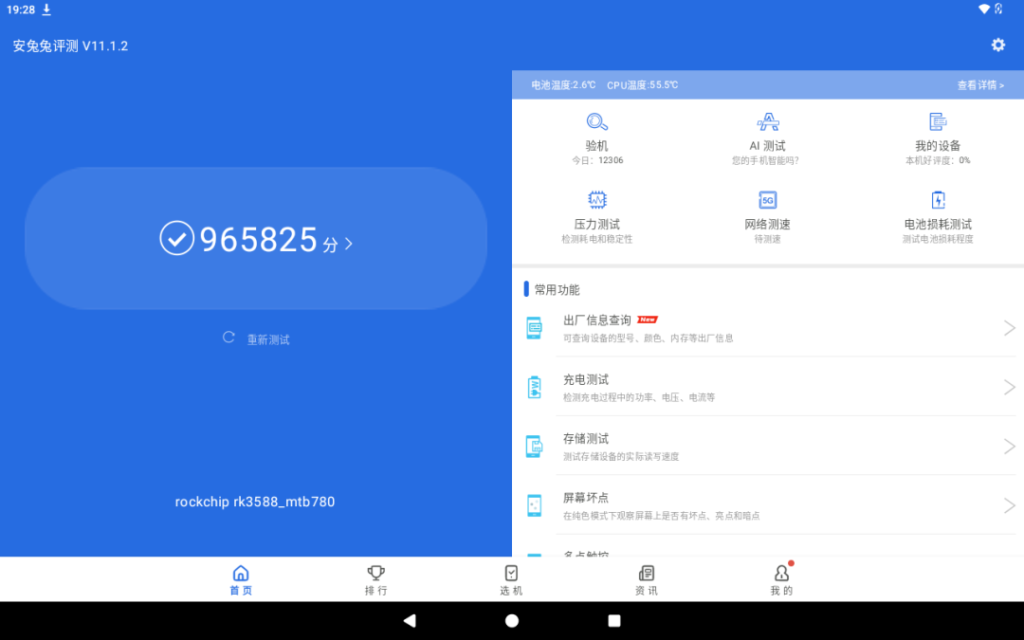
The “hexagonal warrior” among domestic mid-range chips. CPU system scheduling and peripheral management are extremely smooth; the G610 GPU supports 4K/8K hardware video decoding and independent triple-screen output, with multi-window rendering that neither tears nor stutters; the built-in NPU runs a wide range of medium and large AI models reliably.
Suited to:
• Industrial machine vision, high-precision quality inspection
• AI service robots, humanoid robot terminals
• Multi-screen commercial displays, HD medical display devices
• 5G edge gateways, multi-channel AI video analytics
• Smart catering equipment, high-end intelligent terminals
4. Full-machine heterogeneous collaboration in practice: the MPC-1780 industrial PC
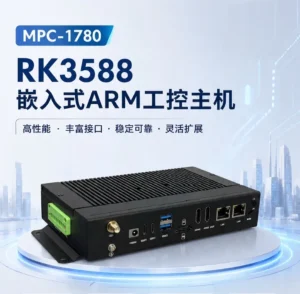
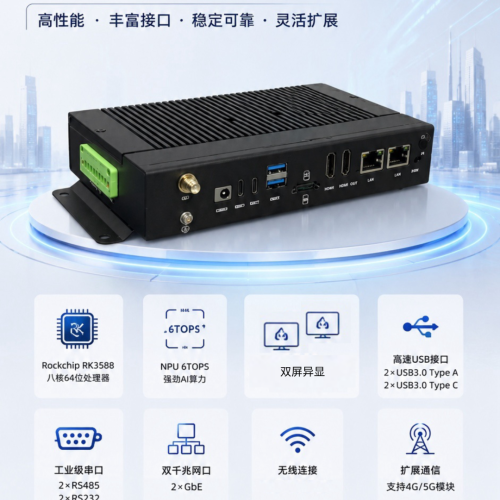
Take the RK3588-based MPC-1780 industrial PC as an example:
• CPU: handles interfaces, protocols, system and device management for industrial-grade stability
• GPU: handles 3D interfaces, HD visualisation and product image rendering
• NPU: runs inspection algorithms and AI recognition inference in real time
The three collaborate heterogeneously with no wasted computing power, perfectly suited to smart warehousing, industrial quality inspection and high-end edge computing scenarios.
3. Final selection summary: stop blindly piling on computing power
CPU = commander: look at stability, scheduling and peripheral capability. For industrial control, IoT and gateways, the CPU always comes first.
GPU = graphics/parallel accelerator: for display, multi-screen, video decoding and vision preprocessing, the GPU is essential.
NPU = dedicated AI core: for recognition, inspection, large models and on-device intelligence, look only at NPU compute power and architecture.
In addition: for radar, high-frequency signals and professional audio scenarios, DSP/FPGA hardware real-time processing is also needed, for even lower latency.
From the entry-level RK3288, the stable RK3568 and the high-value RK3576 through to the flagship RK3588, the full Rockchip platform range covers industrial control, commercial display vision, on-device AI and edge computing.
Many people chase high benchmark scores when selecting a chip, but matching the actual application scenario is what really determines project success. Rocktech provides professional customised hardware solutions, and customers across smart catering, service robotics, industrial automation and intelligent terminals can all work with us on demand.
If you are unsure about motherboard selection or solution planning, we can match the optimal model one-to-one based on your usage scenario, functional requirements and budget, helping projects land reliably with better quality and lower cost.
![{"data":{"pictureId":"D98BE65C-8F54-424C-BA4A-3502A37658CD","activityName":"","capability_key":["filter","erase","edit"],"product":"retouch","filterId":"7544781027848277299","effect_type":"tool","stickerId":"","os":"ios","capability_extra_v2":{"edit":[{"panel":"composition"}],"filter":[{"effect_id":"7544781027848277299","resource_id":"7544781027848277299","origin":"heycan"}],"erase":[{"panel":"magic_eliminate"}]},"imageEffectId":"","effect_id":"filter#7544781027848277299","enter_from":"enter_launch","appversion":"14.2.1","alias":"Q/7sH0y3Z44h1tXFWlkSBjtFZ0FvMmy4Blkh8o4KxV0cSMW3chC5HtGbfmJetNnAciEZM48ejE5b7kJ1IT32BjB6GpnOYcDodRAEbX9wDKeWf8gr8ti4Q1SmHpYGznBmLmNC7IriSokXfrT6aMtOyTuG1eZceAuC2xMd6DW+W8hgi4P3DAPxy5DiHTEQ0qgWTd8hhaPsB3wTEVltvVVd32noWWeNfsTfcBdbpO8Yqs8WCoSw/RIpIAsgJvz3eG9Yg+IMW6WODjGpCeqaM+JxrWO4M9kuvaGMBVpjylmmv7tauNaZTvXuVPfHDNq+TrK88Ain5F+/3Qo8q/MzxaEKiQ==","infoStickerId":"","playId":""},"source_type":"douyin_beauty_me"}](https://en.rockemb.com/wp-content/uploads/elementor/thumbs/1-26032014530QB-rq01talvxyy2o889yf9lo70dywkkfudvu3h4ntxpjc.jpg "1-26032014530QB")