
set up as an internet-sharing Wi-Fi hotspot,
so that mobile devices such as phones and tablets can
connect wirelessly and communicate over the network —
for example, mobile monitoring during production line debugging,
or wireless collection of on-site equipment data.
Many engineers and beginners alike
find hotspot setup, IP allocation
and network sharing steps hard to get started with.
So today~~
the Rocktech technical team
has put together a complete guide that beginners can follow directly,
covering everything from hotspot setup to network sharing,
with detailed steps and troubleshooting for every stage,
compatible with Ubuntu and other mainstream Linux systems,
Bookmark it for later!
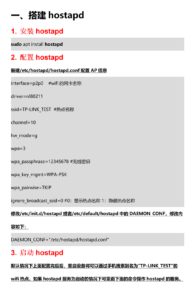
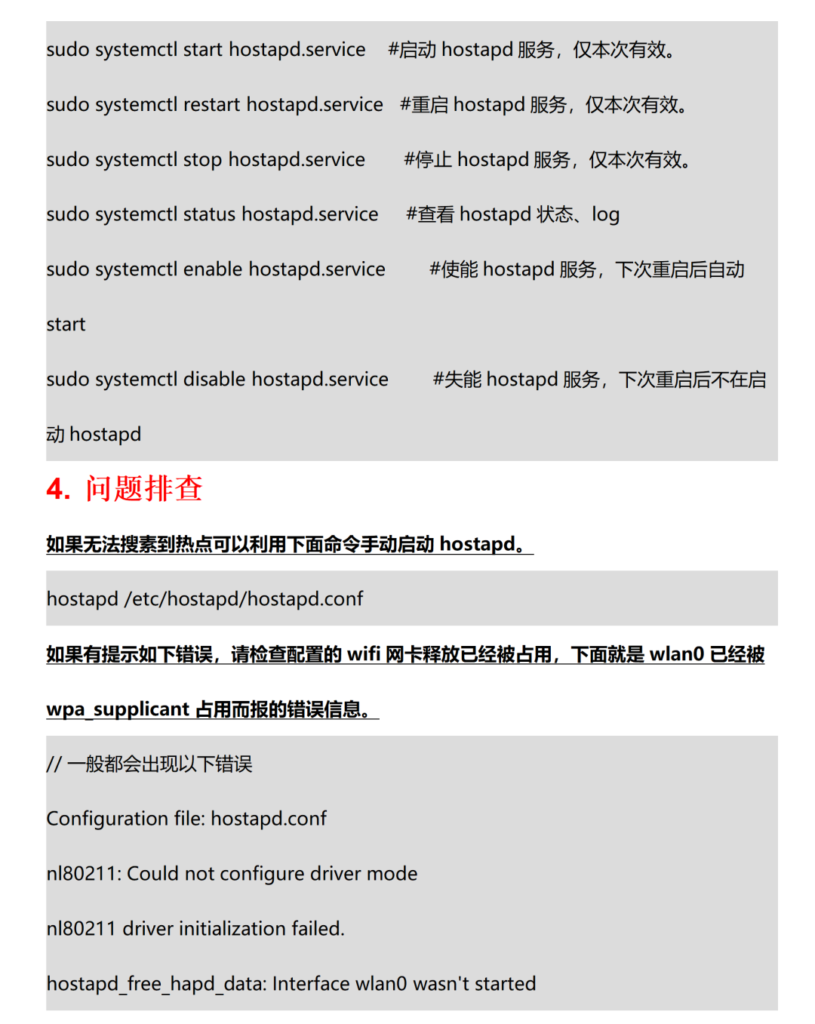
emit a stable Wi-Fi signal, assign IP addresses to connected devices,
and share the wired network (so wireless devices can get online),
meeting the diverse wireless communication needs of industrial sites.
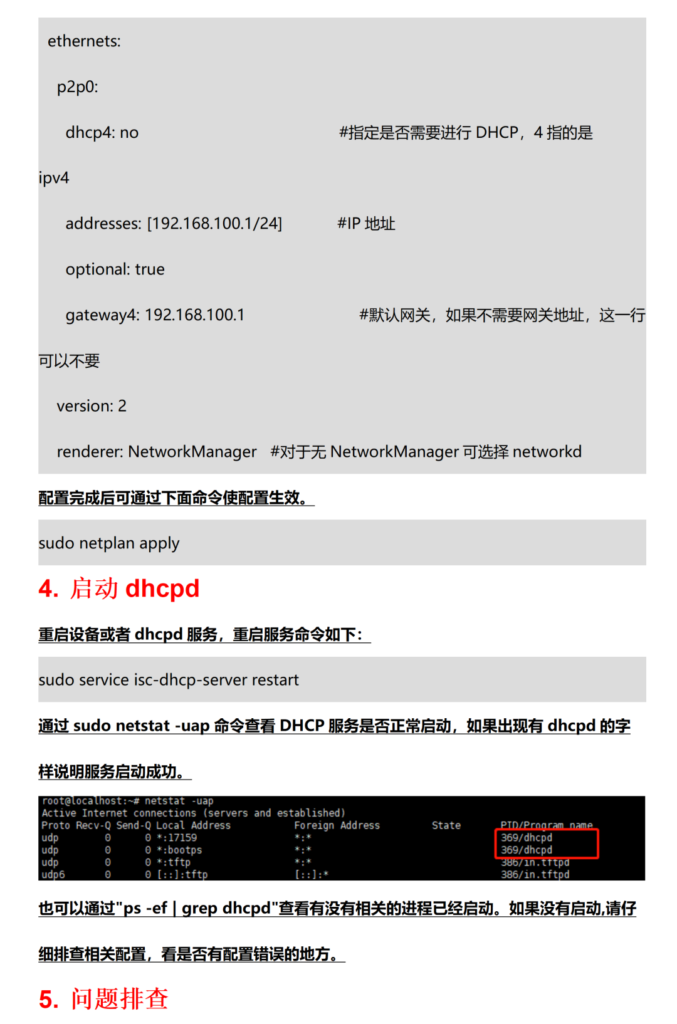
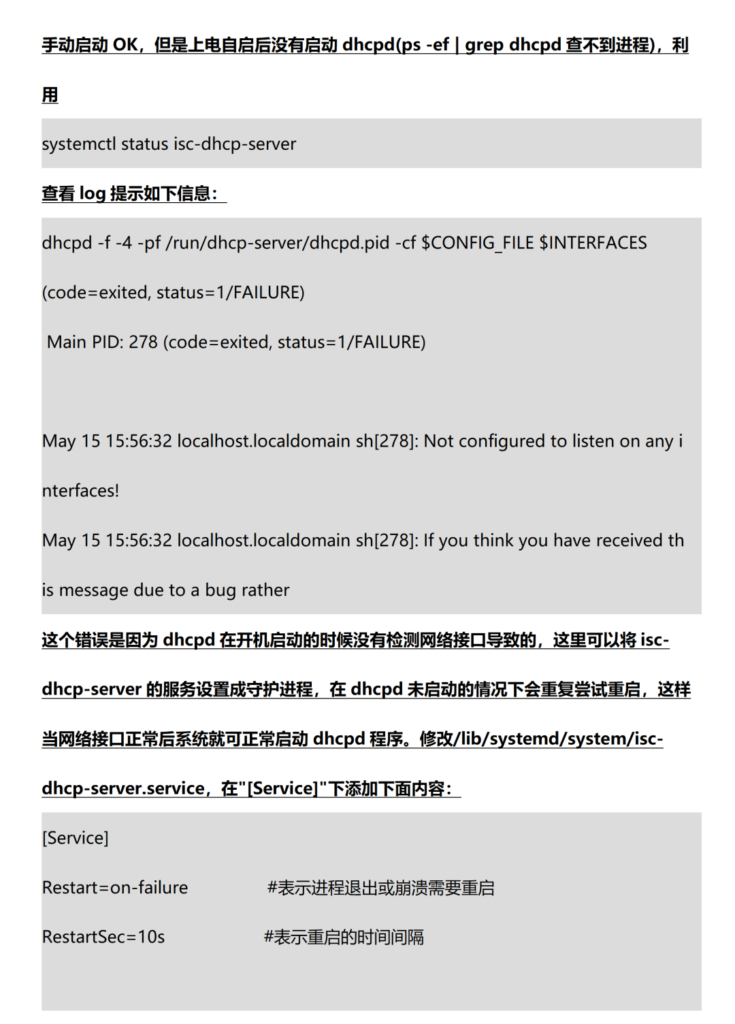
2. Set up a DHCP server: assign IP addresses automatically
With only the hotspot set up,
mobile devices will report “unable to obtain an IP address” when connecting
(rather like being connected to Wi-Fi but having no internet).
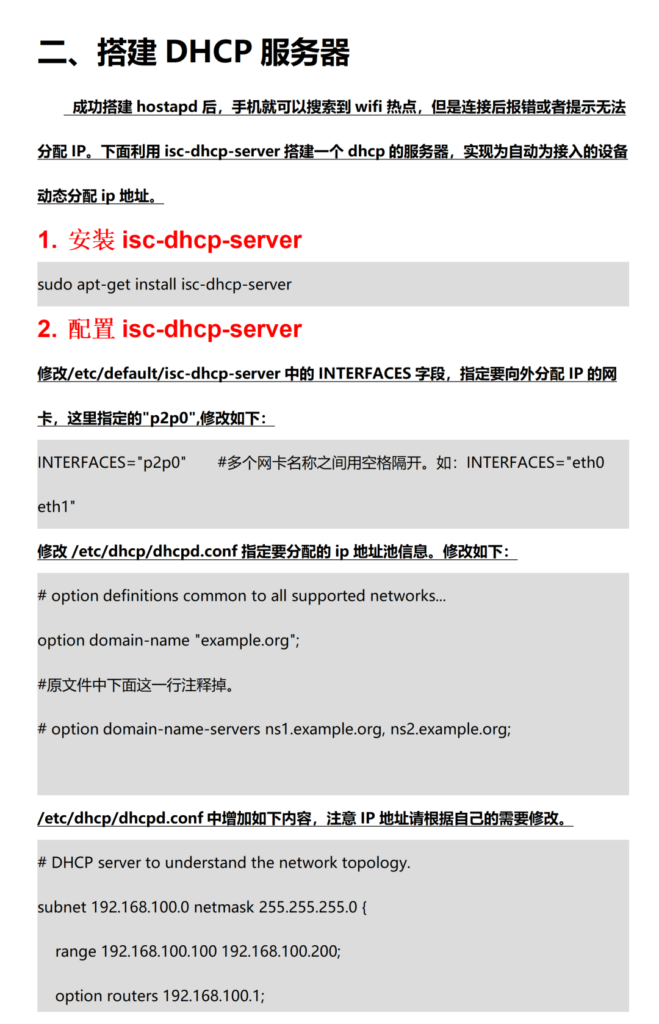
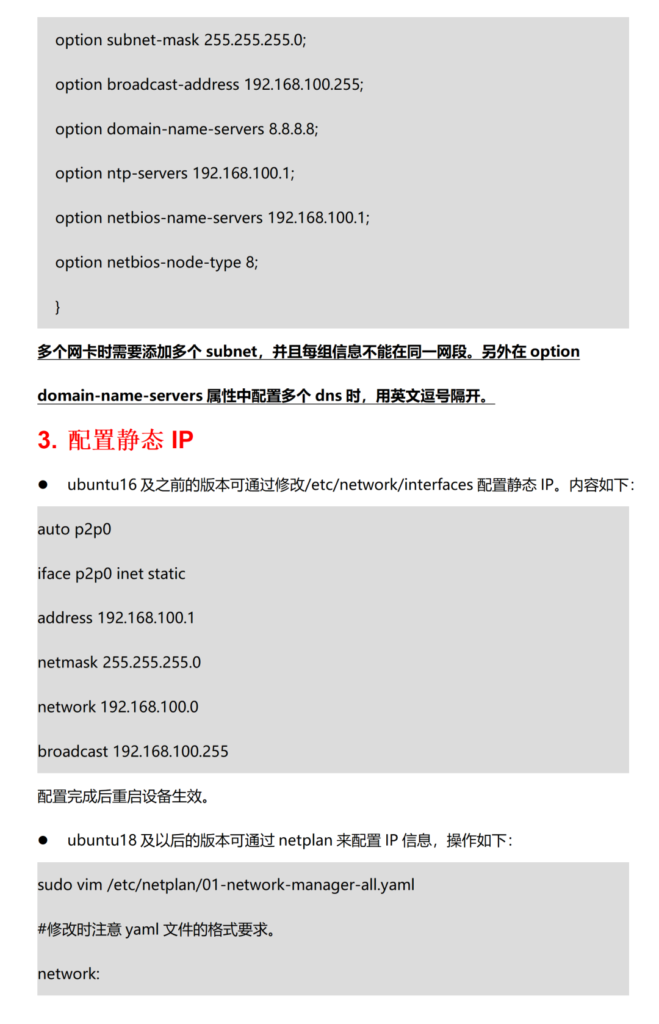
This step requires a DHCP server
to automatically assign IPs to connected devices so they can communicate normally.
3. NAT network sharing: give connected devices internet access
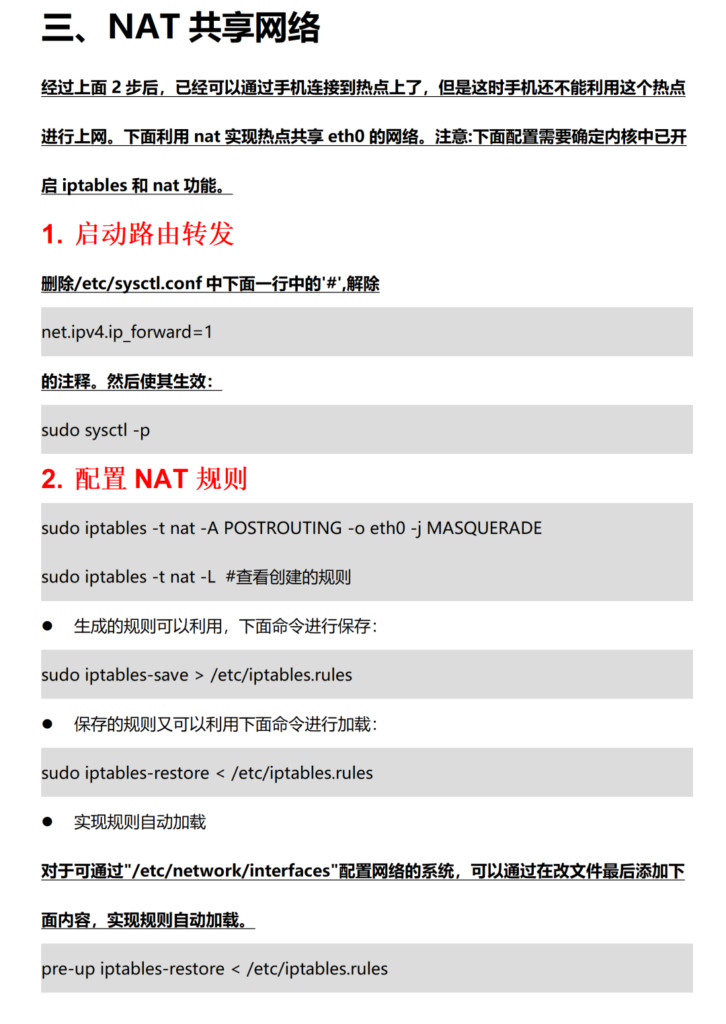
After the first two steps,
mobile devices can connect to the hotspot and obtain an IP,
but cannot reach the internet (only local network communication between devices works).
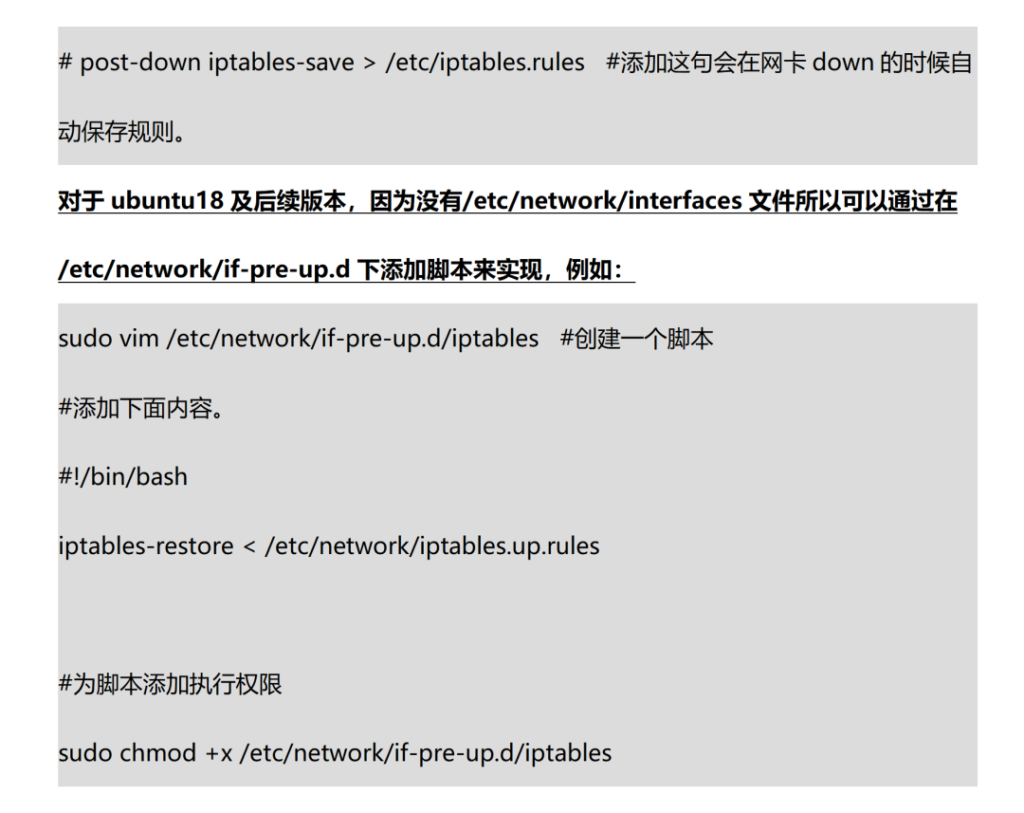
This step uses NAT
to share the industrial PC’s wired network (for example the eth0 NIC)
with the wireless devices,
enabling internet access.
✅ Prerequisites:
Make sure the industrial PC is online through its wired NIC (eth0),
and that the kernel supports iptables and NAT.
delivering stable connectivity and internet access for mobile devices,
perfectly suited to industrial on-site debugging, data acquisition and similar scenarios.
2.the NIC name (p2p0/eth0)Check the actual device to confirm (command: ip addr), to avoid configuration errors;
3. For industrial scenarios we recommend Rocktech industrial-grade PCs, with built-in stable wireless modules supporting wide temperature (-40℃~85℃) and interference-resistant design for more stable hotspot transmission;
4. If configuration issues persist, contact the Rocktech technical support team for a one-to-one solution.
Rocktech focuses on making on-device intelligence smarter, offering a full product range including motherboards, industrial PCs, touch panel PCs and embedded terminals, backed by comprehensive technical support and after-sales service to help enterprises upgrade to industrial intelligence.
![{"data":{"pictureId":"D98BE65C-8F54-424C-BA4A-3502A37658CD","activityName":"","capability_key":["filter","erase","edit"],"product":"retouch","filterId":"7544781027848277299","effect_type":"tool","stickerId":"","os":"ios","capability_extra_v2":{"edit":[{"panel":"composition"}],"filter":[{"effect_id":"7544781027848277299","resource_id":"7544781027848277299","origin":"heycan"}],"erase":[{"panel":"magic_eliminate"}]},"imageEffectId":"","effect_id":"filter#7544781027848277299","enter_from":"enter_launch","appversion":"14.2.1","alias":"Q/7sH0y3Z44h1tXFWlkSBjtFZ0FvMmy4Blkh8o4KxV0cSMW3chC5HtGbfmJetNnAciEZM48ejE5b7kJ1IT32BjB6GpnOYcDodRAEbX9wDKeWf8gr8ti4Q1SmHpYGznBmLmNC7IriSokXfrT6aMtOyTuG1eZceAuC2xMd6DW+W8hgi4P3DAPxy5DiHTEQ0qgWTd8hhaPsB3wTEVltvVVd32noWWeNfsTfcBdbpO8Yqs8WCoSw/RIpIAsgJvz3eG9Yg+IMW6WODjGpCeqaM+JxrWO4M9kuvaGMBVpjylmmv7tauNaZTvXuVPfHDNq+TrK88Ain5F+/3Qo8q/MzxaEKiQ==","infoStickerId":"","playId":""},"source_type":"douyin_beauty_me"}](https://en.rockemb.com/wp-content/uploads/elementor/thumbs/1-26032014530QB-rq01talvxyy2o889yf9lo70dywkkfudvu3h4ntxpjc.jpg "1-26032014530QB")